How to Keep Track of Home Improvements: Receipts, Costs, and Every Detail That Matters
You replaced the roof in 2019. You remodeled the bathroom in 2022. You know you spent real money on both. But when it's time to sell, can you prove it? Here's how to track home improvements so nothing falls through the cracks.

table of contents
Why tracking home improvements matters
Most homeowners track zero home improvements. They pay the contractor, stuff the receipt in a drawer, and move on. Five years later, they sell the house and realize they can't account for $60,000 in renovations.
That's not a hypothetical. It's what happens to most sellers. The IRS lets you add qualifying improvement costs to your home's cost basis, which directly reduces your taxable gain. But only if you can prove what you spent.
Beyond taxes, tracking improvements helps with insurance claims. If a pipe bursts and destroys your remodeled kitchen, your claim is only as strong as your documentation. "We spent about $25,000 on the kitchen" doesn't hold up. "$24,817 across three invoices from ABC Contracting, completed September 2023, with before-and-after photos" does.
And when you sell, a documented improvement history makes your home more attractive to buyers. It shows the house was maintained by someone who paid attention.
What to document for every project
You don't need a filing cabinet. You need a habit. For every home improvement project, capture these six things:
The six-item checklist
- What you did and where (e.g., "replaced roof, entire house" or "new quartz countertops, kitchen")
- Total cost, broken down by materials and labor if possible
- Date completed, not just "sometime in 2023"
- Who did the work, with contractor name, phone, and license number
- Receipts and invoices, photographed or scanned
- Before-and-after photos showing what changed
That's it. Six items. The whole process takes less than five minutes if you do it when the project wraps up. It takes hours of detective work if you try to reconstruct it three years later.
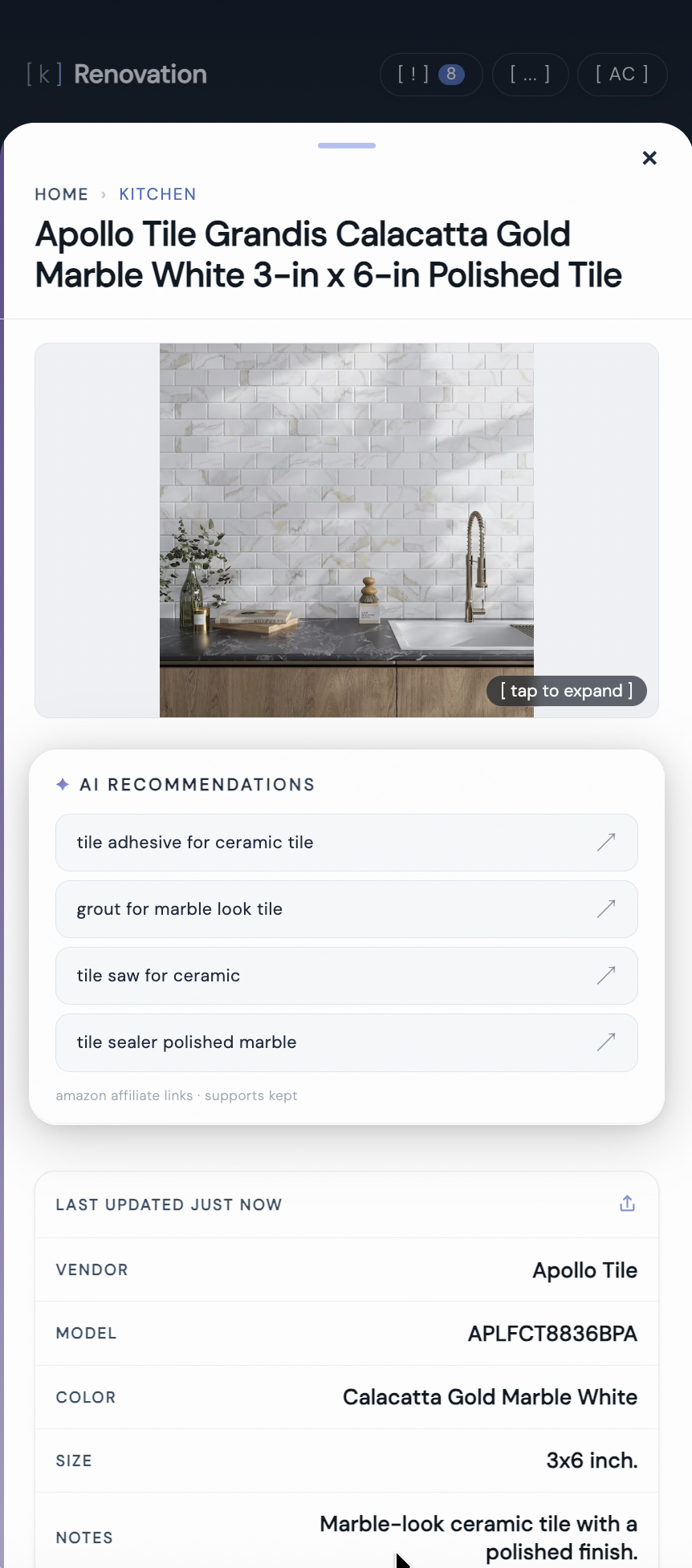
one item in kept with cost, completion date, and contractor info attached.
kept is reader-supported. When you buy through links on this page we may earn a small commission, at no extra cost to you. It never changes what we recommend.
What information should you record in a log for home maintenance and repairs?
Record seven things for every maintenance task or repair: the date, what was done, who did it, what it cost, any parts or materials used, the warranty on the work, and a photo. In list form:
- Date of the work, not "last spring"
- What was done, specific enough that a stranger could understand it ("replaced capacitor on AC condenser," not "fixed AC")
- Who did it: you, or the contractor's name and phone number
- Cost, with the receipt attached
- Parts and model numbers, including filter sizes, paint codes, and part numbers you'd need to reorder
- Warranty on parts and labor, if any
- A photo of the finished work or the part label
The parts line is the one people skip and regret. Six months from now, "what size filter does the furnace take" and "what color is the hallway" are questions your log should answer in seconds. A home maintenance log only earns its keep if it captures the reorder details, not just the dates.
The tax argument you cannot ignore
Here's why this matters in dollars. When you sell your primary residence, the IRS taxes you on the gain: sale price minus your adjusted cost basis. Your cost basis starts at what you paid for the home, plus closing costs. Every qualifying improvement you make adds to that number.
The single-person exclusion is $250,000 ($500,000 for married couples filing jointly). If your gain is under the exclusion, you owe nothing. But in high-appreciation markets, or if you've owned the home for 15+ years, your gain can easily exceed the exclusion. Those caps were set in 1997 and have never been indexed for inflation; a 2025 bill to eliminate them had not become law as of October 2026.
One 2026 change worth knowing: the federal tax credits for energy upgrades (heat pumps, insulation, windows, solar) are gone for work done after 2025. The IRS confirms the home improvement credit covers only improvements made through December 31, 2025. A 2026 heat pump or window job now pays off the way every other improvement does, through your cost basis when you sell, which makes the receipt even more important.
A real example
You bought a house for $350,000 in 2015. Over the next decade, you replaced the roof ($12,000), remodeled the kitchen ($35,000), finished the basement ($28,000), replaced the HVAC system ($8,500), and added a deck ($6,500). That's $90,000 in improvements.
You sell in 2026 for $625,000. Without documented improvements, your gain is $275,000. For a single filer, $25,000 of that exceeds the exclusion and gets taxed.
With documented improvements, your adjusted basis is $440,000. Your gain drops to $185,000, which is fully covered by the exclusion. Zero tax owed. The documentation saved you $3,750 in federal capital gains tax at the 15% rate most sellers pay, or $5,000 at the top 20% rate.
What counts as an improvement
Not everything qualifies. The IRS distinguishes between improvements and repairs. Improvements add value, extend the home's life, or adapt it to new uses. Repairs restore the home to its original condition.
- Improvements (add to basis): new roof, kitchen remodel, bathroom addition, HVAC replacement, new windows, deck, fencing, finished basement, new flooring, driveway replacement
- Repairs (do not add to basis): fixing a leaky faucet, patching drywall, repainting in the same color, replacing a broken window pane, unclogging a drain
The gray area sits between major repairs and minor improvements. Replacing one broken window is a repair. Replacing all the windows in the house is an improvement. When in doubt, track it anyway. Your accountant can sort the classification later, but only if the records exist.
Before-and-after photos that hold up
A photo of your finished kitchen looks great on Instagram. It's less useful for an insurance claim or tax record. Photos that actually serve a purpose follow a few rules.
Take the "before" first
This is the step everyone skips. You're excited about the renovation, not about photographing the old laminate countertop. But the "before" photo is what proves the improvement happened. Take wide shots of the whole room from each corner. Take close-ups of anything you're replacing. Do it the day before demolition starts.
Match the angles
Your "after" photos should be taken from the same spots as the "before" photos. Same corner, same height, same general framing. Side-by-side comparisons are the clearest evidence that work was done.
Include timestamps
Most phone cameras embed date metadata in photos automatically. Don't strip it. If you're adding photos to a tracking app like kept, the upload date gets logged too. Two layers of timestamps make your record stronger.
If you're documenting a project for your home maintenance records, the same photos serve double duty. One set of documentation covers your tax file, your insurance file, and your maintenance log.
Permits, contractors, and the paper trail
Every project that required a permit creates a public record. That's good. But the permit alone doesn't capture what you spent or who did the work. You need to connect the dots yourself.
Permits
Save a copy of every building permit, along with the final inspection signoff. Permitted work is the strongest evidence of an improvement for tax purposes. If your town has an online permit portal, screenshot your records. Portals go offline, get redesigned, and lose historical data.
Contractor documentation
For every contractor you hire, save the signed contract or written estimate, every invoice, and proof of payment. If the contractor is licensed and insured, note those numbers too. This protects you if there's a dispute, and it makes your contractor contact list more useful for future projects.
Material receipts
If you did the work yourself, the material receipts are your proof. Keep them. A $3,000 bathroom tile job with receipts from Floor & Decor adds to your basis. The same job with no receipts adds nothing.
DIY labor doesn't count toward your cost basis. Only materials and contractor labor qualify. But materials alone can still add up to real money over years of projects.
Warranty documents
New roofs, HVAC systems, windows, and appliances come with manufacturer and sometimes contractor warranties. Log the warranty start date, duration, and what's covered. When a 10-year roof warranty is still active and you're selling the house, that's a selling point. And if something fails at year seven, you'll know you're covered.
kept stores project dates, costs, and contractor info so you have the full history when you sell.
[ try kept free ]How to organize all of it
The system matters less than the consistency. Pick one method and stick with it. Here are three options, ranked by how likely you are to actually maintain them.
Option 1: a dedicated app
An app on your phone wins for one reason. Your phone is always with you, and the receipt is in your hand right now. Apps like kept let you snap a photo, enter the cost, tag the contractor, and move on. The whole interaction takes under a minute. A year from now, you search "roof" and everything is there.
This is the approach we recommend for the same reason we recommend any habit: the one with the lowest friction is the one that sticks. If you're already using kept to track your appliance model numbers and furnace filter size, adding home improvement projects takes zero extra setup.
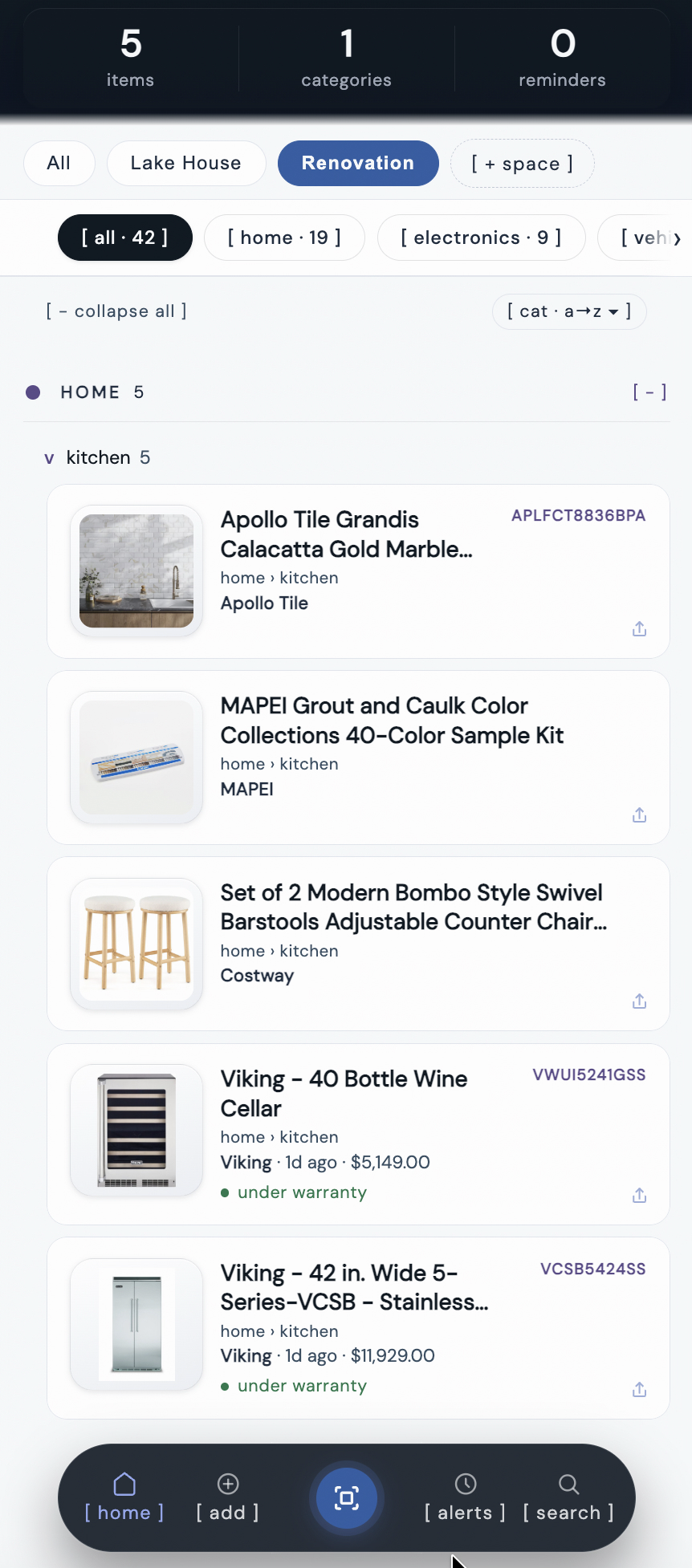
multiple home improvement projects tracked in kept, each with cost and date.
Option 2: a spreadsheet
A Google Sheet or Excel file works if you're disciplined. Create columns for project name, date, cost, contractor, and a link to stored photos/receipts. The weakness is that receipts and photos live somewhere else (Google Drive, a folder on your desktop), and the links between the spreadsheet and the files break over time. If you go this route, use a single cloud folder with a consistent naming convention like 2024-09-roof-replacement/.
Option 3: a physical binder
Tab dividers by year or by project. Printed receipts, contracts, and photos in sheet protectors. This works for people who don't trust digital systems. The risk is physical: water damage, fire, or just losing the binder in a move. If you keep a physical binder, photograph each page as a backup.
The "start now" rule
You don't need to reconstruct every improvement you've ever made. Start with the next one. Then, when you have 15 minutes, go back and add the big projects you remember: the roof, the kitchen, the HVAC. Pull up bank statements or credit card records to find the exact amounts. Rough estimates are better than nothing, but specific dollar amounts with dates are better than estimates.
If you've already tracked your home with a household inventory app, you have a head start. The same system that tracks your refrigerator model number can track the $12,000 you spent replacing it.
Frequently asked questions
What home improvements should I keep track of for taxes?
Track any improvement that adds value, prolongs the life, or adapts your home to new uses. This includes roof replacement, kitchen and bathroom remodels, new windows, HVAC systems, decks, fencing, and finished basements. Routine repairs like fixing a leaky faucet or repainting a room in the same color do not count. The IRS lets you add qualifying improvement costs to your home's cost basis, which reduces your taxable gain when you sell.
How long should you keep home improvement receipts?
Keep home improvement receipts for as long as you own the home, plus at least three years after you file the tax return for the year you sell. If you owned the home for 15 years and made improvements in year two, you need those receipts for 18+ years. Digital copies stored in a cloud-backed app are the safest way to make sure they survive that long.
Can I deduct home improvements without receipts?
The IRS does not technically require receipts, but without them you have a much harder time proving your cost basis. Bank statements, credit card records, and contractor invoices can serve as backup documentation. But the burden of proof is on you. Starting a tracking habit now, even for past projects, gives you something to point to if you ever get audited or need to justify your basis at sale.
What is the best way to track home renovation costs?
The best system is one you will actually use. A spreadsheet works if you are disciplined about updating it. A dedicated app like kept works better for most people because you can snap a photo of a receipt, log the cost, and attach contractor details in under a minute. The key is capturing the information at the moment you have it, not months later when the receipt is gone and the numbers are fuzzy.
Do home improvements increase your home's cost basis?
Yes. Qualifying home improvements are added to your original purchase price to calculate your adjusted cost basis. When you sell, you subtract the adjusted basis from the sale price to determine your gain. A higher basis means a lower taxable gain. For example, if you bought for $300,000 and made $80,000 in documented improvements, your basis is $380,000. If you sell for $500,000, your gain is $120,000 instead of $200,000. The single-person exclusion is $250,000, so basis adjustments matter most for long-term owners or high-appreciation markets.
What is the best app for logging home improvement costs?
kept is built for exactly this: snap a photo of the receipt, log the cost, and attach the contractor's name and permit number, all in under a minute per entry. It's free, requires no account, and everything is searchable later when you need a total for taxes or a resale conversation, with no digging through a shoebox or a years-old email thread.