Best Home Inventory App in 2026: Track Everything You Own
We compared the top home inventory apps (Sortly, Encircle, HomyScan, ecohome, and kept) on what actually matters: setup speed, daily usefulness, recall monitoring, and insurance export. Here's what we found.

table of contents
- What a home inventory app actually does
- Best home inventory apps in 2026 compared
- What to track (and what to skip)
- How to build your inventory without quitting
- App types compared
- Recall monitoring: the feature most apps skip
- Ask your inventory a question
- Inventory for insurance vs. daily reference
- FAQ
What a home inventory app actually does
A home inventory app is a catalog of what you own. Each entry usually has a name, room, photo, purchase date, price, and serial or model number. When something breaks, gets stolen, or needs a warranty claim, you open the app instead of digging through email or guessing.
That sounds simple. Most people still track this in Notes, a shared Google Doc, or not at all. The problem is not knowing you need a list. It is that manual entry is slow, the list gets stale, and you cannot find the furnace filter size when you are standing in aisle 14.
A good household inventory app solves two jobs at once: documentation for insurance and reference for running the house. Those overlap more than most apps admit. Your refrigerator's model number matters for a claim and for ordering a water filter.
Best home inventory apps in 2026 compared
Dozens of apps claim the category. We tested the ones people actually use and compared what matters: how fast you can add items, what you can do with the data afterward, and whether the app earns its place on your phone a month later.
| App | Best for | Free tier | Recall alerts | AI features |
|---|---|---|---|---|
| kept | Daily reference + insurance: filter sizes, paint codes, warranties, model numbers | 50 items, no account | Yes, auto-matched to CPSC | AI Capture, AI chat about your items |
| Sortly | Visual inventory with folders and QR labels | 100 items | No | No |
| Encircle | Insurance documentation and claims | Yes (limited) | No | No |
| HomyScan | Simple room-by-room photo catalog | Yes | No | AI photo recognition |
| ecohome | Category-based item management with cloud backup | Yes | No | No |
| Spreadsheets | Total flexibility, no cost | Free | No | No |
Most inventory apps focus on one job: documenting what you own for insurance. That is important, but it is not why people open the app on a Tuesday. The apps that stick are the ones that solve the Tuesday problems: what filter does my furnace take, when does the dishwasher warranty expire, what paint color is in the guest bedroom.
kept is the only app in the category that also monitors CPSC product recalls against your inventory and lets you ask questions about your items using AI chat. More on both below.
See the difference in 60 seconds
Open kept, scan a barcode on any appliance, and watch the model details fill in. No download, no account. That's the whole pitch.
try kept freeWhat to track (and what to skip)
You do not need every spoon. Focus on items that cost money to replace or that you look up repeatedly.
Track these first
- Major appliances: fridge, range, dishwasher, washer, dryer, HVAC. Model and serial numbers live on data plates. Our guide on where to find appliance model numbers covers each type.
- Electronics over $200: TVs, laptops, tablets, consoles. Serial numbers matter for theft claims and warranty calls.
- HVAC consumables: furnace filter size, AC filter size, last replaced date.
- Paint and finishes: room name, brand, color code. See how to save paint codes by room.
- Tools and outdoor equipment: mowers, snow blowers, grills with model numbers and purchase years.
- High-value furniture and jewelry: photo, approximate value, receipt if you have it.
Skip for now
- Pantry goods, clothing unless high value, generic decor under $50
- Anything you would not bother claiming or looking up again
kept is reader-supported. When you buy through links on this page we may earn a small commission, at no extra cost to you. It never changes what we recommend.
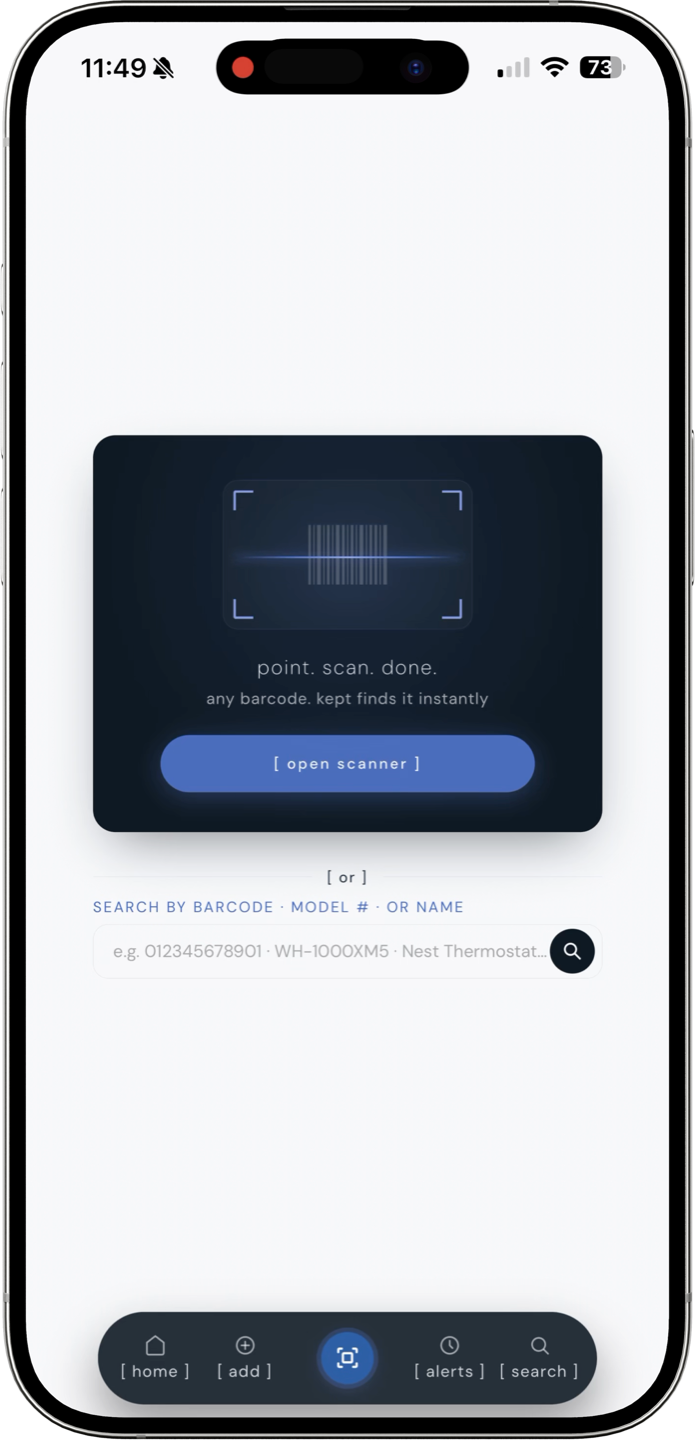
scan any barcode and kept fills in the product details automatically.
How to build your inventory without quitting
The number one reason home inventories fail is trying to do the whole house in one weekend. You will not. Do it in passes.
- Pass 1 (30 minutes): Kitchen and laundry. Scan barcodes on appliances still in boxes or on visible data plates. While you have model numbers, cross-check them against active recalls. Our guide to hidden product recalls covers five common ones still in millions of homes.
- Pass 2 (30 minutes): Living room and primary bedroom. TV, soundbar, laptop, mattress if it was expensive.
- Pass 3 (20 minutes): HVAC filters, water heater, thermostat. Write filter sizes even if you skip photos.
- Pass 4 (ongoing): Add new purchases when you unpack them. One item per box beats a backlog.
For insurance-grade detail, see our full walkthrough on home inventory for insurance. Same data, more emphasis on photos and values. If you are in a storm or wildfire state, the 30-minute hurricane home inventory is the version to do before the season, not during it.
App types compared
Not every "home app" solves inventory. Match the tool to the job.
| App type | Best for | Weak spot |
|---|---|---|
| Insurance inventory (Sortly, Encircle) | Photos, values, claim export | Day-to-day specs like filter sizes |
| Spreadsheets / Notes | Free, flexible | No barcode scan, hard to search on mobile |
| Task apps (Cozi, shared calendars) | Chores and schedules | Not built for model numbers or warranties |
| Household management (kept) | Model numbers, filters, paint, contractors, warranties | Not a chore calendar |
If you want a deeper comparison of home organization categories, read best home management apps for 2026.
Why homeowners use kept
kept is a home inventory app built for the moment you actually need the information: hardware store, warranty call, contractor on the phone, insurance adjuster asking for serial numbers. For what building a catalog feels like in practice, read six months with kept. Open kept in Safari and add it to your iPhone home screen for one-tap access when you are standing in a store aisle.
- Barcode scan: point at a product label and model details fill in. Here's how a home inventory app with a barcode scanner does the data entry for you.
- CPSC recall monitoring: kept checks your items against new recalls every day. No other inventory app does this.
- AI chat: ask questions about your own inventory in plain language.
- Structured fields: category, room, warranty end date, custom notes.
- Reference + inventory: same app holds your TV serial and your 20x25x1 filter size.
- Family sharing: share a space with your household so everyone has the same info.
- CSV export: pull a list when you need it for insurance or taxes.
- Free to start: 50 items, no account. kept+ removes limits at $19.99/year.
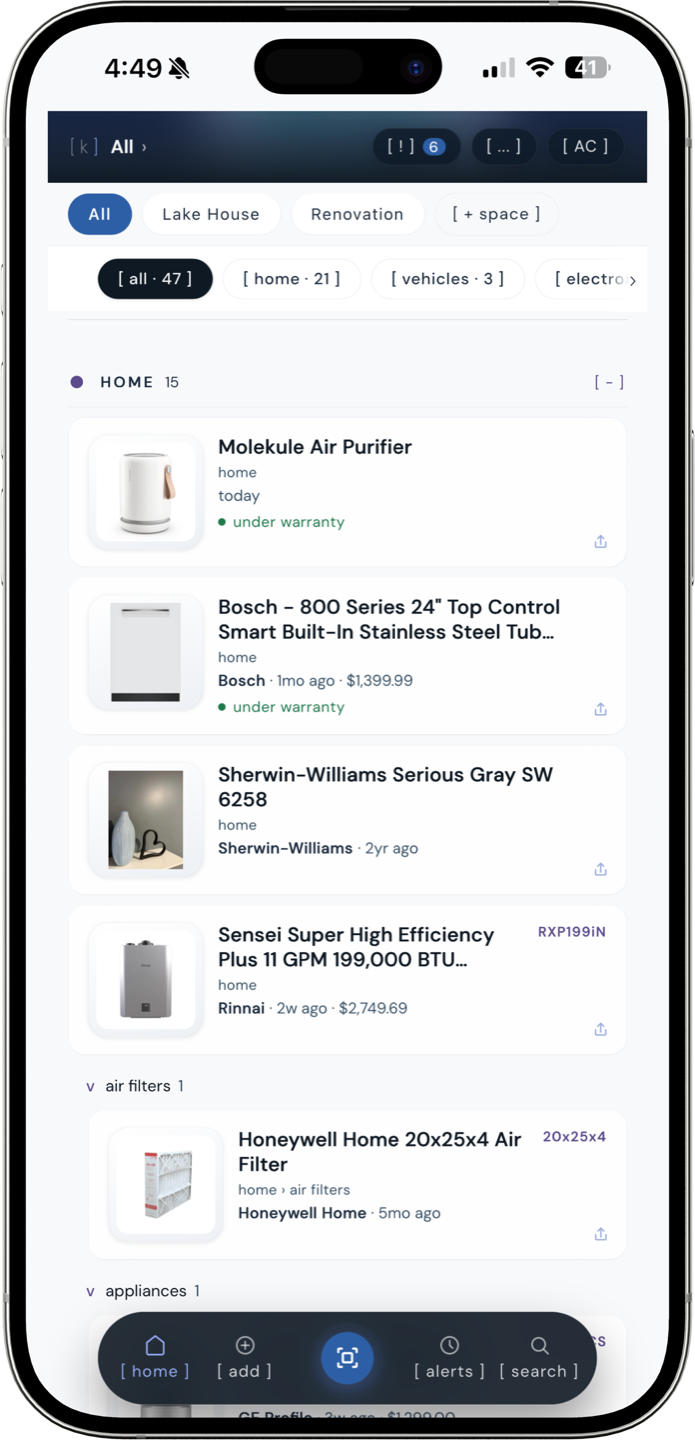
a real inventory in kept: items organized by category with warranty status, prices, and model numbers visible.
Recall monitoring: the feature most apps skip
The CPSC issues roughly 300 product recalls per year. Most consumers never check. The ones who do are usually searching after a news scare, not before a problem happens.
kept monitors the CPSC and FDA recall databases every day and matches new recalls against items in your inventory by model number and product description. When something you own appears on a recall list, you get a specific flag on a specific item you actually have, not a generic news alert.
No other home inventory app does this. Sortly, Encircle, HomyScan, and ecohome all store your items but never check them against recall data. You can set up CPSC email alerts yourself, but those are keyword-based and noisy. kept's matching is tied to the actual model numbers in your catalog.
For how the recall system works in detail, see how kept checks your items against CPSC recalls. For the broader landscape, appliance recalls: how to check if yours is recalled covers manual lookup methods too.
Ask your inventory a question
Most home inventory apps are databases. You add items, you search items, you export items. kept adds a layer on top: AI chat that knows what you own.
You can ask questions like:
- "Which appliances are still under warranty?"
- "What paint color did I use in the living room?"
- "What size filter does my furnace take?"
- "What's the most expensive thing in the garage?"
The AI reads your inventory and answers in plain language. It is not a general chatbot. It only knows what you have told it by adding items. That constraint is the point: it gives you a conversational interface to your own data instead of making you scroll and search.
Every user gets 5 free ask kept questions; after that, unlimited AI chat is part of kept+ ($19.99/year). The free tier includes barcode scan, photos, and 50 items.
Inventory for insurance vs. daily reference
Insurance inventories care about replacement value and proof of ownership. Daily reference inventories care about specs you reuse: filter size, paint code, bulb type, contractor number.
Most homeowners need both in one system. Otherwise you maintain Sortly for claims and a notes app for filter sizes, and neither stays current.
If you ever file a claim, documentation wins. Read how to file a home insurance claim for what adjusters ask for on day one. Your inventory is the answer sheet.
kept stores model numbers, purchase dates, and warranty info for everything in your house. One scan, done.
[ try kept free ]Frequently asked questions
What is the best free app for home inventory?
kept is free in your browser with no account required and holds 50 items on the free plan, including photos, warranty dates, and barcode scan. No app download needed. Sortly offers a free tier with 100 items but requires a native app install. For unlimited items, AI Capture, and automatic recall monitoring, kept+ is $19.99 per year.
Is there an app to catalog everything in your house?
Yes. kept and Sortly are the two most popular options. Both let you add items with photos and organize by room or category. kept speeds up data entry with barcode scanning: point your phone camera at a product label and the model number, specs, and product details fill in automatically. You do not have to type every item by hand.
How do I make a home inventory for insurance?
Go room by room. Photograph or scan barcodes on items over $50 and anything with a serial number. Record make, model, purchase date, and price. Do one room per session so you do not burn out. Kitchen and living room first, then bedrooms, garage, and basement. Export the list as a CSV or PDF for your insurer. Your adjuster needs proof of ownership, not a perfect catalog.
Is Sortly good for home inventory?
Sortly is a solid visual inventory app with folder organization and QR code labels, best if you want a polished photo catalog you can browse. Where it falls short for homeowners: no barcode-to-specs lookup, no CPSC recall monitoring, and no built-in tracking for filter sizes, paint codes, or warranty dates. kept covers those daily-reference details plus automatic recall alerts. Sortly requires a native app; kept runs in your browser.
How do I track appliance warranties and model numbers in an inventory?
In kept, scan the barcode or search by model number when you add an item. The app pulls the manufacturer, model, and specs automatically. Add the purchase date and kept estimates the warranty expiration. You can also set a custom warranty end date and get a reminder before it lapses. All of this lives on the item card alongside the serial number, photos, and service history.