Home Binder: What to Include and How to Build One That Works
Your house generates a surprising amount of information: filter sizes, model numbers, paint colors, warranty dates, contractor names. A home binder puts all of it in one place so you can find it in seconds instead of digging through drawers.

table of contents
What is a home binder?
A home binder is a single reference that holds the important details about your house. Appliance model numbers, paint colors, filter sizes, warranty dates, contractor contacts, shut-off valve locations. Everything a homeowner forgets six months after moving in.
The concept started as a physical three-ring binder with tabbed dividers and printed pages. Some homeowners still set them up that way. But the idea is simple: one place to look when you need to know something about your home.
Most people already have pieces of this information scattered across their phone, a kitchen drawer, a folder on the computer, and their partner's memory. A home binder just collects it.
What to include in your home binder
Not everything about your house belongs in a home binder. Tax returns go in a fireproof safe. Closing documents go with your mortgage paperwork. The home binder is for operational information: the stuff you reach for when something breaks, needs replacing, or needs a touch-up.
Here's what matters most.
Home binder master checklist
- ☐ Appliance model numbers, serial numbers, and purchase dates
- ☐ Warranty documents and expiration dates
- ☐ Paint colors by room (brand, name, finish, code)
- ☐ Furnace filter size and MERV rating
- ☐ HVAC service history and next service date
- ☐ Water heater age, type, and last flush date
- ☐ Contractor contacts with notes on past work
- ☐ Utility account numbers and provider contacts
- ☐ Shut-off locations (water, gas, electrical panel)
- ☐ Wi-Fi network name and password
- ☐ Security system code and monitoring company
- ☐ Home insurance policy number and agent contact
If you're building a home inventory app catalog at the same time, the two overlap heavily. Your home binder is the quick-reference layer. Your inventory is the full catalog of what you own, with photos and values, for insurance purposes. For what daily use actually feels like after months of tracking, read six months with kept.
Appliances and warranties
Appliances are the backbone of a home binder. You own 8 to 15 of them, and each one has a model number, a serial number, a purchase date, and a warranty window. When the dishwasher stops draining, you need that model number to order a part or schedule a repair. When the fridge dies two years in, you need proof of purchase to file a warranty claim. If you already have the serial or the purchase date, our free warranty check tool tells you whether that claim is still live before you pick up the phone.
Walk through your house and record these details for every major appliance. It takes about 20 minutes. Here's exactly where to find model numbers on each appliance type.
Appliances to document
- ☐ Refrigerator (model, serial, purchase date)
- ☐ Dishwasher
- ☐ Washing machine
- ☐ Dryer
- ☐ Oven or range
- ☐ Microwave
- ☐ Water heater (also note tank capacity and type)
- ☐ Furnace and AC unit
- ☐ Garage door opener
- ☐ Any smart home devices (thermostat, doorbell, locks)
For each appliance, save the purchase receipt or a photo of it. That receipt is your warranty proof. If the receipt is long gone, check your email for an order confirmation or credit card statement. Our warranty tracking guide covers what to do when you've lost the paperwork.
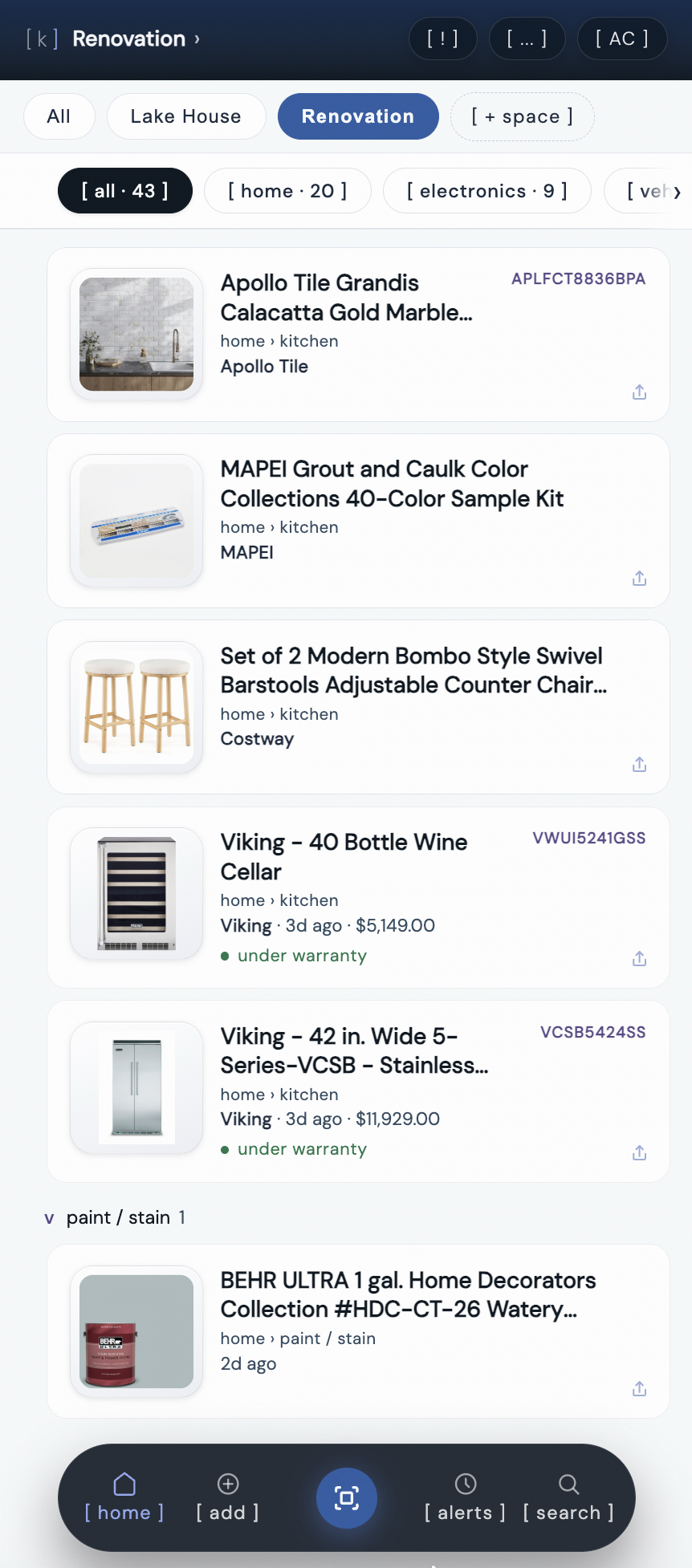
your home binder as a searchable list, organized by category.
kept is reader-supported. When you buy through links on this page we may earn a small commission, at no extra cost to you. It never changes what we recommend.
Maintenance records
Your home binder should double as a maintenance log. Not a vague "remember to do maintenance" reminder, but a record of what was done, when, and by whom.
This matters for three reasons. First, it tells you when the next service is due. If your HVAC was serviced in October 2025, you know it needs attention by October 2026. Second, it shows a buyer your home was well maintained if you sell. Third, it gives your contractor context when they show up. "The last tech replaced the capacitor in May" is more useful than "someone fixed something last year."
What to track
- HVAC service dates and what was done (filter change, coil cleaning, any refrigerant added). Note the amount if a tech adds refrigerant: a sealed system shouldn't need topping off, so a second "top-off" in the log points to a leak worth fixing.
- Your AC's refrigerant type, printed on the outdoor unit's data plate. Under EPA rules, new home AC and heat pump systems moved off R-410A to lower-impact refrigerants like R-454B and R-32 starting in 2025. Older R-410A systems can still be serviced, but knowing which one you have makes repair-or-replace quotes easier to compare.
- Water heater flushes and anode rod inspections (annual for tank heaters)
- Roof inspections and any repairs, with the roofer's name
- Gutter cleaning dates (twice a year in most climates)
- Pest control treatments and any issues found
- Furnace filter changes and the filter size you used
A full breakdown of what your house needs and when is in our home maintenance checklist. Use your binder to track which items you've actually completed.
Paint colors and finishes
Paint colors are the thing homeowners wish they'd saved. You repaint the living room in Benjamin Moore Revere Pewter HC-172 and think you'll remember. You won't. Two years later you need to touch up a scuff and you're standing in the paint aisle squinting at 14 different grays.
For every room, record the brand, color name, color code, and finish (flat, eggshell, satin, semi-gloss). The finish matters as much as the color. Touch up a satin wall with eggshell and the patch shows.
Paint info to save
- ☐ Every room: brand, color name, code, finish
- ☐ Trim and baseboards (often a separate white)
- ☐ Ceilings (flat white, but which white?)
- ☐ Exterior body and accent colors
- ☐ Front door color
- ☐ Where you bought it (store, location)
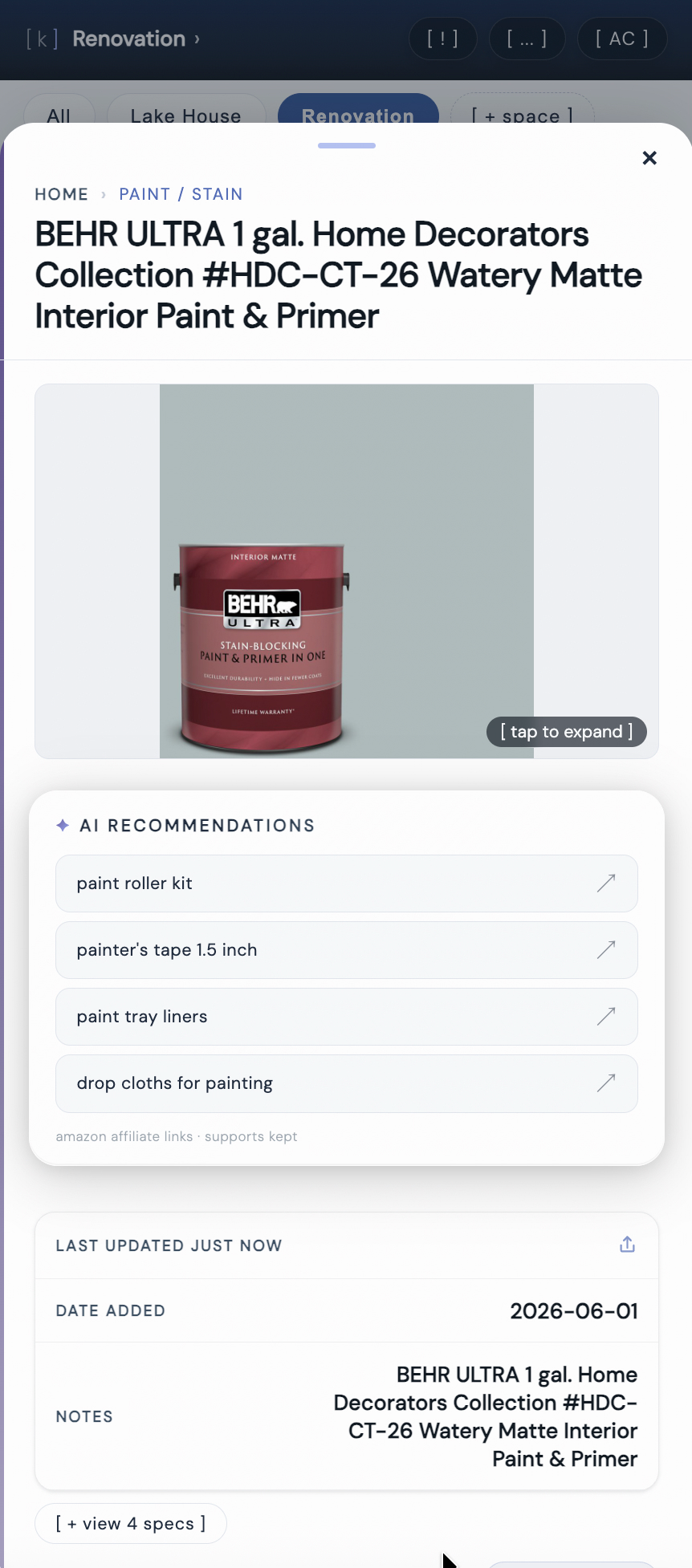
a paint color saved in kept with brand, color code, and AI-suggested supplies.
If you moved in and don't know the colors, check the garage for leftover cans. Ask the previous owner. If neither works, our guide to matching paint on a wall walks through the chip-sample method and app-based matching.
kept stores every detail a home binder would hold, searchable from your phone, shareable when you sell.
[ try kept free ]Contractor contacts
A good plumber, electrician, or HVAC tech is hard to find. Once you find one, your home binder is where their contact information should live. Not in your phone's contact list (where it gets buried) and not on a business card in a kitchen drawer (where it disappears).
For each contractor, save their name, phone number, what they specialize in, and a note about any work they did. "Replaced kitchen faucet, March 2026, $285" is the kind of detail that saves you from re-explaining your plumbing to a new person every time. Our full guide on building a contractor contact list covers what to track and how to vet new contractors.
Contractors to track
- Plumber
- Electrician
- HVAC technician
- General handyman
- Roofer
- Pest control
- Landscaper
- Appliance repair tech
Moving in? Ask the previous owner for their contractor contacts before closing. They spent years finding reliable people. A simple text message can save you months of trial and error.
Digital vs. paper: which works better
The original home binder was a three-ring binder with tab dividers, printed spreadsheets, and plastic sleeve inserts for receipts. It worked. But it had real limitations.
A paper binder can't be searched. You have to flip through tabs to find a model number. It can't come with you to the hardware store unless you carry it out the door. It can be destroyed in a fire or flood, exactly the moment you need your home inventory the most. And when your partner needs the plumber's number, they have to find the physical binder first.
A digital home binder solves all of that. You search "dishwasher" and get the model number in two seconds. You're at the paint store and pull up the color code on your phone. Your partner searches "plumber" and calls them directly. If your phone breaks, the data is backed up in the cloud.
When paper still makes sense
Some people prefer paper for documents that rarely change: a printed copy of the breaker panel map, a floor plan with shut-off locations marked, or a page of emergency contacts taped inside a kitchen cabinet. That's fine. Use both. But the searchable, day-to-day reference should be digital.
How to start yours in 20 minutes
You don't need a full afternoon. Start with the five things homeowners forget most, then add more over time.
The 20-minute version
- Pull out the furnace filter. Read the size on the frame. Save it. Slide it back in. Two minutes. Here's how to find your furnace filter size if the label is worn.
- Photograph three appliance data plates. Fridge, dishwasher, and washing machine. Save the model numbers. Six minutes.
- Note one paint color. Check the garage for a leftover can. If you find one, save the brand, name, and finish. Three minutes.
- Save your best contractor's contact. The plumber, the electrician, whoever you trust most. Add their name, number, and what they do. Two minutes.
- Find and photograph the breaker panel. Take a photo of the label. Note where the panel is in the house. Three minutes.
That's your starter binder. You now have your filter size, three model numbers, a paint color, a contractor contact, and your breaker panel mapped. More than most homeowners ever record.
Over the next few weeks, add the rest: remaining appliances, more paint colors, water heater details, utility account numbers. Each one takes a minute or two. The hardest part is starting.
Frequently asked questions
What should be included in a home binder?
A home binder should include appliance model numbers and serial numbers, warranty documents and purchase receipts, paint colors by room (brand, name, finish), furnace filter size and MERV rating, contractor contacts (plumber, electrician, HVAC tech), utility account numbers and shut-off locations, home insurance policy details, and a maintenance log showing service dates for major systems. Focus on information you'll need to find quickly when something breaks or needs attention.
Should a home binder be digital or paper?
A digital home binder is more practical for most homeowners. Paper binders can't be searched, can't travel with you to a hardware store, and can be destroyed in a fire or flood. A digital version on your phone means you always have your furnace filter size at the store, your contractor's number in an emergency, and your appliance model number when filing a warranty claim. Apps like kept store all of this in a searchable format you can access anywhere.
How do I organize a home maintenance binder?
Organize your home binder by category, not by date. Group appliances together with their model numbers, warranties, and purchase dates. Keep paint colors sorted by room. Store contractor contacts with notes about what work they did. Add a maintenance section with service dates for HVAC, water heater, roof, and gutters. The goal is finding any piece of information in under 30 seconds, so organize by how you'll search for it, not how you collected it.
What is the difference between a home binder and an insurance binder?
A home binder is a personal organization system for tracking everything about your house: appliances, maintenance records, paint colors, and contractor contacts. An insurance binder is a temporary legal document from your insurance company that proves you have homeowners insurance coverage before the full policy is issued. You typically need an insurance binder at closing when buying a house. The two are completely unrelated despite sharing a name.
When should I start a home binder?
Start your home binder the week you move in. That first week is when the information is easiest to collect: appliances are accessible, the previous owner might still answer a text about paint colors or contractor contacts, and leftover paint cans may still be in the garage. Every week you wait, a piece of information gets harder to find. If you already live in your house, start today with whatever you can grab in 20 minutes: pull out the furnace filter, photograph your appliance labels, and note your paint colors.
What should you leave in a home binder for a buyer?
Appliance manuals and warranty info for anything staying with the house, paint colors and codes by room, contractor contacts for major systems (HVAC, roof, water heater), permits for any renovation work, and a maintenance log showing service history. It's the single biggest goodwill gesture you can leave. Buyers who inherit this information avoid months of guessing, and it's the exact list the next owner would otherwise spend a year rebuilding from scratch.