CPSC Recalls Search + Free Alerts for Stuff You Own
Every Thursday the CPSC posts a fresh batch of product recalls. Toys, strollers, dehumidifiers, blenders, lithium batteries that catch fire. Here's how to actually check if anything in your house is on the list, and how to stop checking one product at a time.

table of contents
Quick answer: the official CPSC recall search lives at cpsc.gov/Recalls. Type the product name or brand into the search bar and filter by year. For anything with a motor or a plug, also check recalls.gov, which pools recalls from the CPSC, NHTSA, FDA, and USDA in one place. Both are free and neither needs an account.
Why recalls actually matter
The CPSC issues recalls for products that can hurt you. Cribs that strangle infants. Space heaters that start fires. Power banks that explode. Blenders with blades that detach mid-spin. These are not theoretical risks. They are products already in homes, already being used, already on the agency's incident database.
The catch: the recall only protects you if you hear about it. Manufacturers post a notice, the CPSC publishes it, news outlets pick up the big ones, and that's the system. Nobody calls you. Nobody emails the original buyer unless you registered the product. If you bought a humidifier two years ago and the same model gets recalled today, you find out by accident, or you don't find out at all.
That's the problem this post is about. The CPSC publishes the recall data. The tools to check it are free. The reason most people get caught off guard is they have no list of what's in their house to compare against. Five of the biggest recalls still sitting in homes are covered in our post on hidden product recalls most homeowners miss.
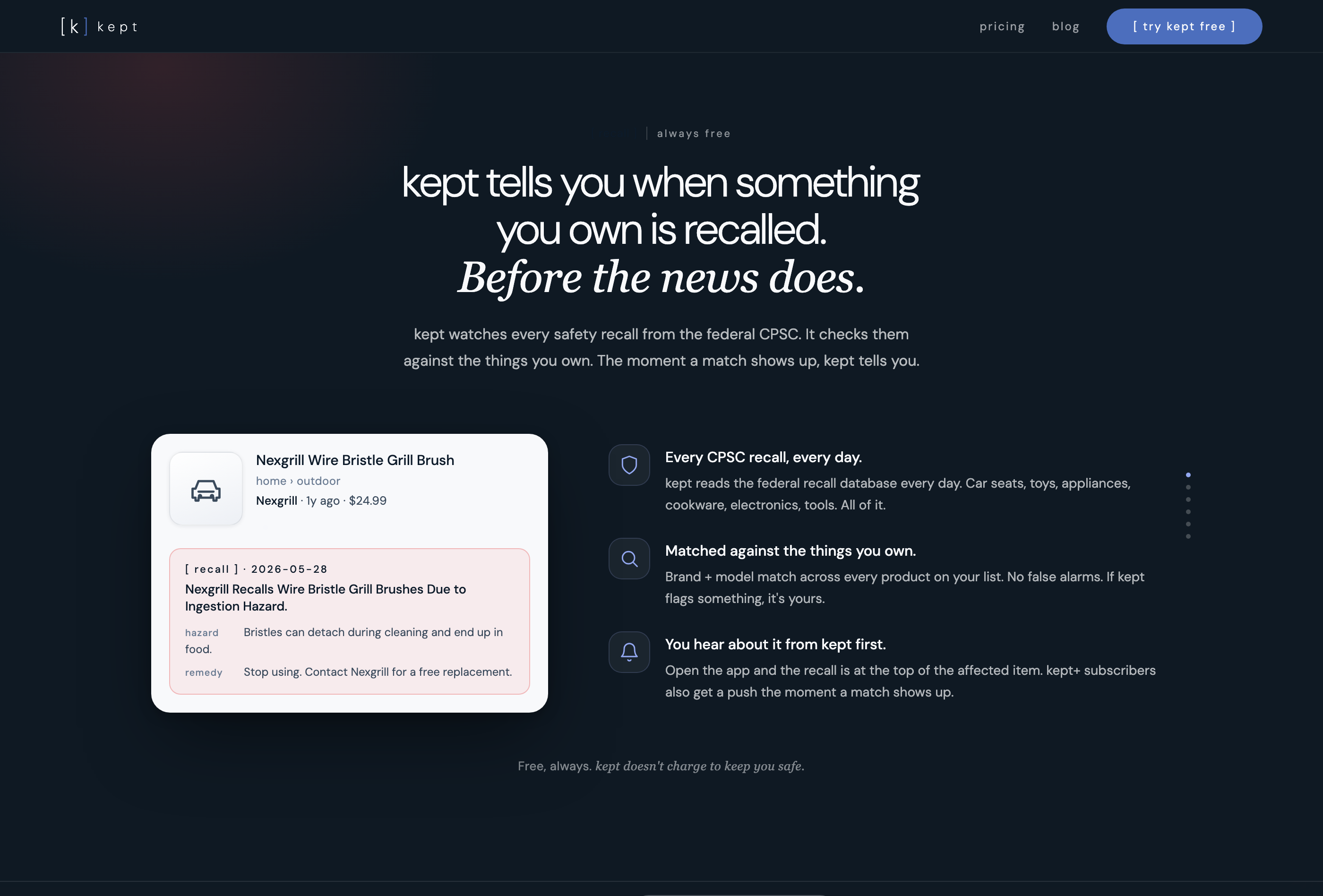
kept reads the CPSC database daily and matches it against what you own automatically.
What happened to the CPSC Recall App
The CPSC launched a "Recall App" in February 2019. It was never a store app: it was a progressive web app, a web page you saved to your phone's home screen, released as a beta. We couldn't find a current version in October 2026, and there's no official CPSC app in Apple's App Store. Plenty of third-party "recall" apps fill that gap, so check who publishes one before you trust it.
In practice, the CPSC's "app" today is cpsc.gov/Recalls in your phone's browser. Add it to your home screen and you get the same search, photos, hazards, and remedy instructions.
What the CPSC search is good for
- Looking up a specific product. Type a brand and model and see if anything matches.
- Browsing by category. Filter by toys, appliances, furniture, sports equipment, and so on.
- Reading the hazard details. Each notice explains what can go wrong, what dates and lot numbers are affected, and how to get a refund or replacement.
- Prefer not to keep checking? Our guide to CPSC recall alerts covers every way to get notified automatically.
What the CPSC search is not good for
- It does not know what you own. You search one product at a time.
- It does not scan barcodes. You type the brand and model by hand.
- It does not remind you about anything you searched before.
- If you forget the model number, you have to go find the data plate again.
The search is a reference. It tells you what has been recalled. Whether anything in your house matches is still a question you answer yourself, by walking around and reading labels.
recalls.gov, NHTSA, and FDA
The CPSC handles consumer products. Other agencies handle the rest. If you want one search box that covers everything, start at recalls.gov.
Where to check by category
- recalls.gov. Aggregates CPSC, NHTSA, FDA, USDA, EPA, and Coast Guard. One search, every category.
- cpsc.gov/Recalls. Appliances, toys, furniture, sporting goods, electronics, baby gear.
- nhtsa.gov/recalls. Vehicles, car seats, tires. Search by your 17-digit VIN.
- fda.gov/safety/recalls. Food, drugs, medical devices, cosmetics.
- fsis.usda.gov/recalls. Meat, poultry, and processed egg products.
If you only check one, make it recalls.gov. It will route you to the right agency when there's a match, and it covers categories most people forget about (like the car seat in the back of the SUV, which is regulated by NHTSA, not CPSC).
kept is reader-supported. When you buy through links on this page we may earn a small commission, at no extra cost to you. It never changes what we recommend.
What info you need to check a recall
Recalls almost never apply to every unit of a product. They apply to specific manufacturing runs, defined by model number plus date code or serial range. A recall notice might read: "Sold from March 2023 through September 2024, model AC-450, units with serial numbers starting with K7."
To match that against something in your house, you need the brand, the model number, and ideally the serial number or purchase date. The brand alone is not enough. Whirlpool makes hundreds of dishwashers and only one might be on the list.
Where the info lives
- Appliances. Data plate inside the door, on the back, or behind a kick plate. Our guide on where to find the appliance model number covers every type.
- Electronics. Sticker on the back or bottom of the device, or in the settings menu.
- Baby gear and toys. Tag sewn into fabric, or molded into the plastic on the underside.
- Furniture. Tag stapled to the underside of a cushion or frame.
- Power tools and yard equipment. Plate on the body of the tool, near the handle or motor housing.
kept's recall matching in action. a nexgrill grill brush flagged automatically after the CPSC issued an ingestion hazard recall.
The painful part of checking recalls is not the searching. It's gathering this information for the first time. If you have not done it, every recall notice means walking around the house pulling out appliances and decoding tiny labels. If you have done it and saved it in kept, the app does the matching for you.
kept scans your saved items against active recalls so you find out before something goes wrong.
[ try kept free ]The inventory method: check once, get notified later
There are two ways to track recalls. The reactive way and the inventory way.
The reactive way: you read a news story about a recall, walk to the appliance, find the data plate, compare model numbers, and either breathe out or file a claim. You do this every time you see a headline.
The inventory way: you build a list of what you own once, with brand and model number on every item. When a recall hits, the app matches it against your inventory for you. kept does this automatically. If the CPSC recalls a dishwasher model and that model is in your kept inventory, a red [ recall ] pill appears on the item. Open it and you see the hazard, the remedy, and a link to the official recall page.
The inventory method scales. The reactive method does not, which is why most people only check recalls when the news is loud enough to cut through. Quieter recalls (which still include serious hazards) get missed. With an inventory-based approach, the quiet ones get caught too.
The same list helps with tracking warranties, documenting items for insurance, and ordering replacement parts. Automatic recall matching is one of several reasons to build an inventory, and it's the one that protects your family, not just your wallet. It is especially worth doing for appliance recalls, where a fire or shock hazard can sit unnoticed for years.
What to do if something you own is recalled
You found a match. The model is on the list, the serial is in the affected range. Here's the order of operations.
- Stop using the product. Especially for fire, electrical, fall, or strangulation hazards. Unplug it if it has a plug. Remove batteries if it has them.
- Read the remedy section of the recall notice. Most recalls offer a free repair, replacement, or refund. Some require you to ship the product back. Some send a replacement part. Some send a prepaid label.
- Gather proof. The manufacturer usually wants the serial number, sometimes a photo of the product with a code written on it (so you can't claim twice), and sometimes proof of purchase. If you saved the receipt in kept, this is two taps.
- File the claim through the link in the recall notice. Use the official manufacturer page or the CPSC link. Skip any third-party site asking for payment.
- Save the claim confirmation. Timing depends on the company, and refunds and replacements often take several weeks. Keep the confirmation until it shows up.
- Update your records. If you get a replacement, add the new unit to your inventory. If you got a refund, mark the original as removed.
Heads up: Never throw the recalled product in the trash unless the notice explicitly says to. Lithium battery recalls in particular often require specific disposal at a hazardous waste site, not curbside.
The 60-second weekly habit
The CPSC posts new recalls on Thursdays. In 2026 the weekly list has run 6 to 18 items, about 11 on average. Scrolling it takes a couple of minutes. Most weeks, nothing matches anything you own. The week something does match, you'll be glad you looked.
Two ways to make this a habit:
- Email alerts. Sign up at cpsc.gov for free weekly recall emails. They land in your inbox automatically. Scan the subject lines, open if anything looks familiar.
- Thursday bookmark. Bookmark cpsc.gov/Recalls on your phone's home screen. Make it part of your Thursday morning routine, the same way you check the weather.
If you also have a kept inventory, you can skip the manual check entirely. kept matches new CPSC recalls against your items automatically. Open the app and any affected item already has a red [ recall ] pill on it, with the hazard and remedy details one tap away. The Thursday habit becomes: open kept, see if anything is flagged, close it.
To go deeper on recalls specifically: our walkthrough on how to check if a product you own has been recalled covers the manual search step by step, and our guide to CPSC recall alerts shows how to get the official email feed.
For the broader picture of staying on top of your house, our home maintenance checklist covers the rest of the weekly, monthly, and seasonal tasks worth tracking.
Frequently asked questions
How do I check if a product I already own has been recalled?
Go to recalls.gov or cpsc.gov/Recalls and search by brand and product name. On a phone, use the same site in your browser; there's no official CPSC app in the App Store. To match accurately, you need the model number and ideally the serial number or date code from the product's data plate. An inventory app like kept can do this matching automatically if you have saved your items' brand and model info.
Can I still use a product that has been recalled?
No. The CPSC recommends you stop using a recalled product immediately, even if you have not experienced any problems with it. The recall was issued because the product poses a specific hazard, such as fire, shock, or injury. Unplug it, remove batteries if applicable, and follow the remedy instructions in the recall notice before using it again.
Do I get a refund for a recalled product?
Most recalls offer a free repair, replacement, or full refund. The specific remedy depends on the recall. You typically need the serial number or proof of purchase. Timing varies by company; many refunds take several weeks. Some refunds now ask for a photo of the product with its cord cut or a code written on it instead of a return. There is generally no deadline to file a recall claim, even if you discover the recall months or years after it was issued.
How often does the CPSC issue new recalls?
The CPSC posts new product recalls on Thursdays, about 11 a week on average in 2026 (anywhere from 6 to 18). You can sign up for free email alerts at cpsc.gov so each week's list lands in your inbox automatically. Scrolling the weekly list takes a couple of minutes, and most weeks nothing on it matches anything you own.
Is there an app that tracks product recalls for things I already own?
The CPSC's own tools, cpsc.gov/Recalls and its email list, let you search and follow recalls, but they do not know what you own. kept is a home inventory app that stores your brands, model numbers, and serial numbers, then matches them against CPSC recalls automatically. If something you own gets recalled, kept flags the item with a red [ recall ] pill and shows you the hazard, the remedy, and a link to the official notice.
Can I scan a barcode to see if a product is recalled?
Yes. Scan a barcode in kept and it looks up the product, filling in the brand, model number, and category automatically. Once that item is saved, kept checks it against the CPSC recall database in the background, so if it's ever recalled you'll see a red [ recall ] pill on the item without doing anything else. The scan is what gets the item into the match in the first place.